Elowbe LookAndFeel
Status: Experimental
Java Version: 17+
Learning Curve: Easy
Last Release: elowbe-laf-0.0.1
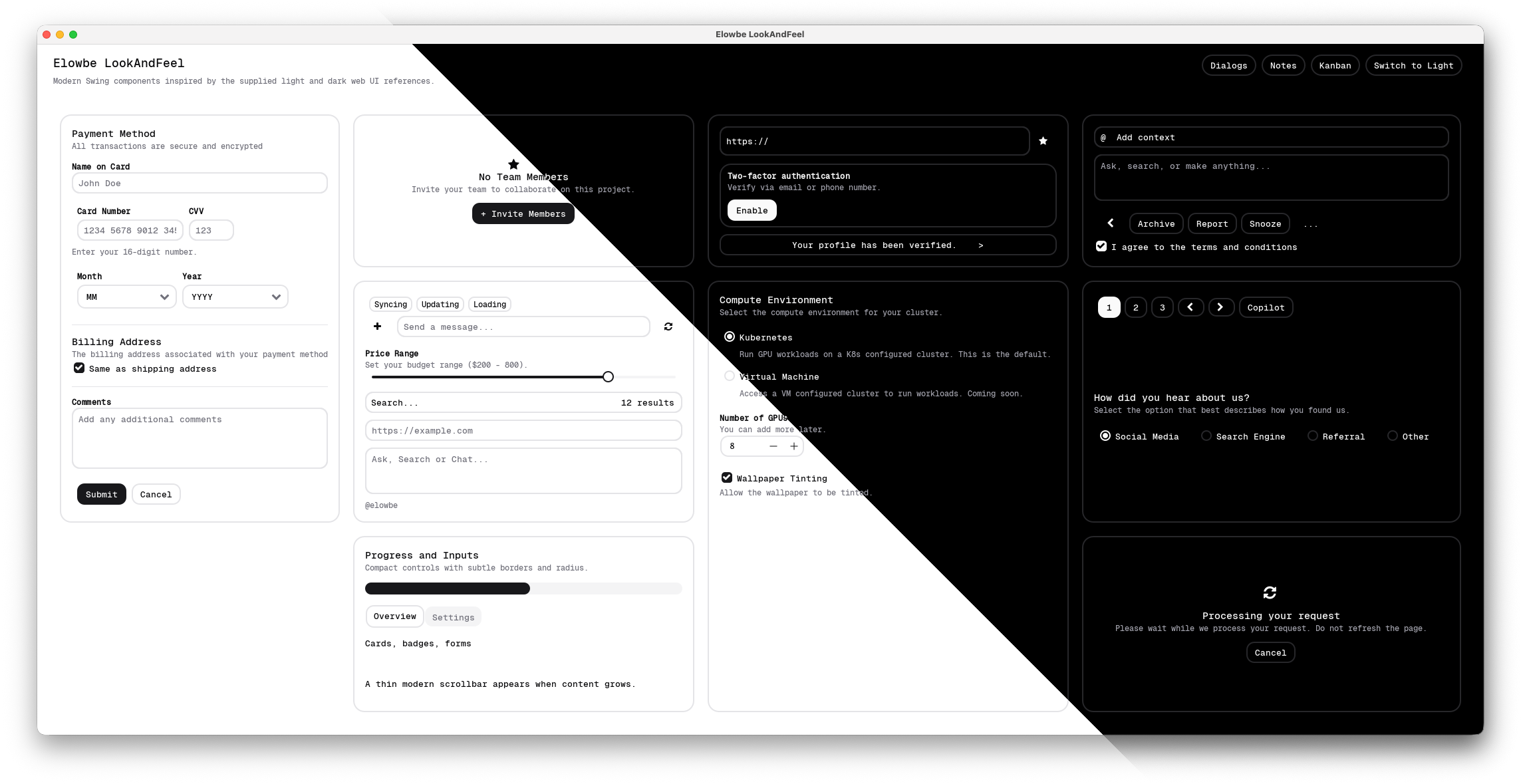
Elowbe LookAndFeel on GitHubElowbe LookAndFeel is a modern, shadcn-inspired Look and Feel for Java Swing, bringing a clean flat design aesthetic to traditional desktop applications. It provides custom UI delegates for a wide range of Swing components including buttons, text fields, combo boxes, check boxes, radio buttons, sliders, scroll bars, spinners, tabbed panes, table headers, progress bars, file choosers, and color choosers. Components without a custom delegate fall back gracefully to platform defaults.
The library ships with light and dark themes switchable at runtime via
Elowbe.toggleTheme() or
Elowbe.setTheme(ElowbeTheme.DARK), automatically refreshing all open windows. It uses Vercel's Geist font for a crisp, contemporary look. Elowbe requires Java 17+ and is cross-platform, running on macOS, Windows, and Linux wherever Swing is supported. Installation is via a JAR on the classpath alongside a JIconFont dependency, or built from source with Maven.
The project is early-stage (version 0.0.1) but already includes a rich demo suite covering a component gallery, dialogs, a kanban board, a note-taking app, an image cropper, and a node graph editor, making it a compelling option for developers wanting modern Swing visuals inspired by current web design systems.
Code Example
            import com.elowbe.laf.Elowbe;
            import com.elowbe.laf.theme.ElowbeTheme;
            import javax.swing.*;

            public class HelloElowbe {
                public static void main(String[] args) {
                    // Install the Look and Feel before creating any UI components
                    Elowbe.install(ElowbeTheme.LIGHT); // or ElowbeTheme.DARK

                    SwingUtilities.invokeLater(() -> {
                        JFrame frame = new JFrame("Elowbe Demo");
                        frame.setDefaultCloseOperation(JFrame.EXIT_ON_CLOSE);

                        JPanel panel = new JPanel();
                        JTextField nameField = new JTextField(20);
                        JButton greetButton = new JButton("Say Hello");
                        JLabel resultLabel = new JLabel(" ");

                        greetButton.addActionListener(e ->
                            resultLabel.setText("Hello, " + nameField.getText() + "!")
                        );

                        panel.add(new JLabel("Name:"));
                        panel.add(nameField);
                        panel.add(greetButton);
                        panel.add(resultLabel);

                        frame.add(panel);
                        frame.pack();
                        frame.setLocationRelativeTo(null);
                        frame.setVisible(true);
                    });
                }
            }