jDeploy
Status: Production-ready, Active
Java Version: 8+
Learning Curve: Easy
Last Release: v6.0 (February 2026)
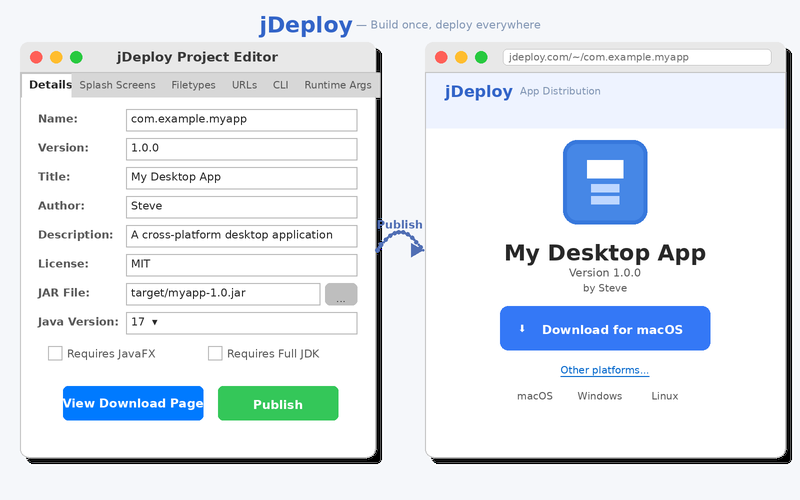
jDeploy Official WebsitejDeploy is a free, open-source (Apache v2) tool that simplifies desktop application deployment for Java developers. Download the jDeploy desktop app, point it at your project's JAR file, configure your app icon and settings through the GUI, and click Publish—jDeploy handles the rest, generating native installers for Mac, Windows, and Linux with built-in automatic updates. Unlike jpackage, jDeploy handles cross-platform builds without requiring the target OS, and Mac installers are signed and notarized by jDeploy's infrastructure, eliminating the need for an Apple Developer account. The tool works with any JVM application including JavaFX, Swing, and Kotlin Compose Multiplatform, automatically downloading the appropriate JDK or JavaFX runtime on first launch. Each published app gets a download page that detects the user's platform and offers the appropriate installer. Version 6.0 extends beyond GUI applications to support multi-modal deployments: a single package can include GUI apps, CLI commands, background services, system tray helpers, and MCP servers for AI tool integration. For automated releases, the jDeploy GitHub Action can build and publish your app whenever you push a tag or commit to a branch.
Code Example
            // package.json - jDeploy configuration
            {
              "name": "my-app",
              "version": "1.0.0",
              "jdeploy": {
                "jar": "target/my-app.jar",
                "javafx": true,
                "jdk": false,
                "javaVersion": "17"
              }
            }
            # Initialize jDeploy in your project directory
            jdeploy init

            # Publish your app (opens GUI for first-time setup)
            jdeploy publish
            # With Claude Code and the jDeploy MCP server:
            > Setup jDeploy for this project